Top tracks by units sold
Rank tracks by invoice-line quantity.
select t.name, sum(il.quantity) as units
from track t
join invoice_line il on il.track_id = t.track_id
group by t.track_id, t.name
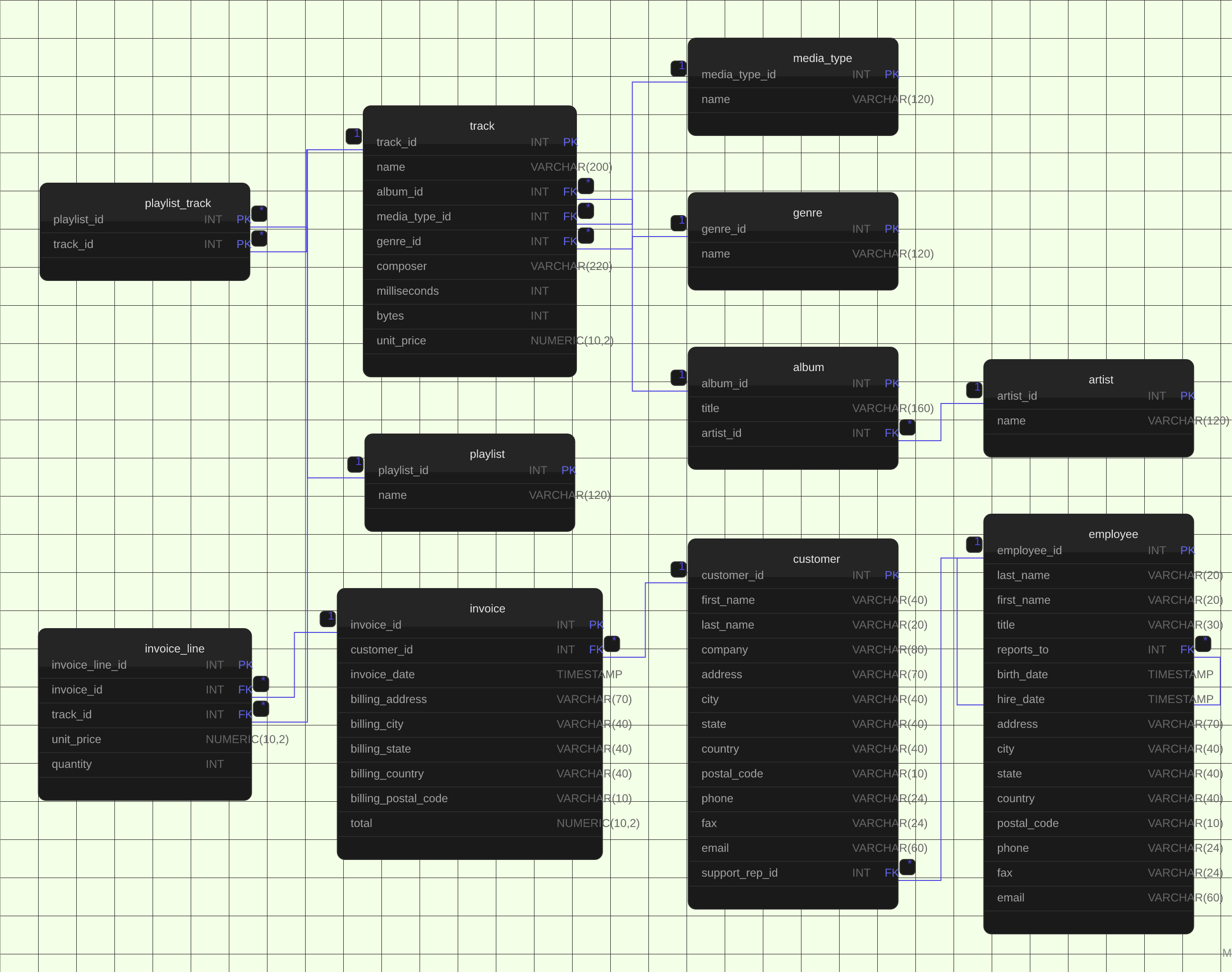
order by units desc, t.name;Chinook is a digital music store sample database: artists release albums, albums contain tracks, tracks have a genre and a media type, customers buy tracks through invoices and invoice lines, and tracks are grouped into playlists. All eleven tables and their foreign keys are mapped in the diagram above. Two details worth knowing: playlist_track is a composite-key join table with no surrogate id, and track.album_id and track.genre_id are nullable - a track can exist without an album (singles) or a genre, while media_type_id is always required.
Written by Varun Krishnan · Founder, dbdiagramr
Published · Updated
Source: Chinook database v1.4.5, Chinook_PostgreSql.sql (lerocha/chinook-database) · License: MIT
Chinook v1.4.5 PostgreSQL script by Luis Rocha.
Indexes, views, and the script's database-creation statements are omitted. Chinook_PostgreSql.sql.
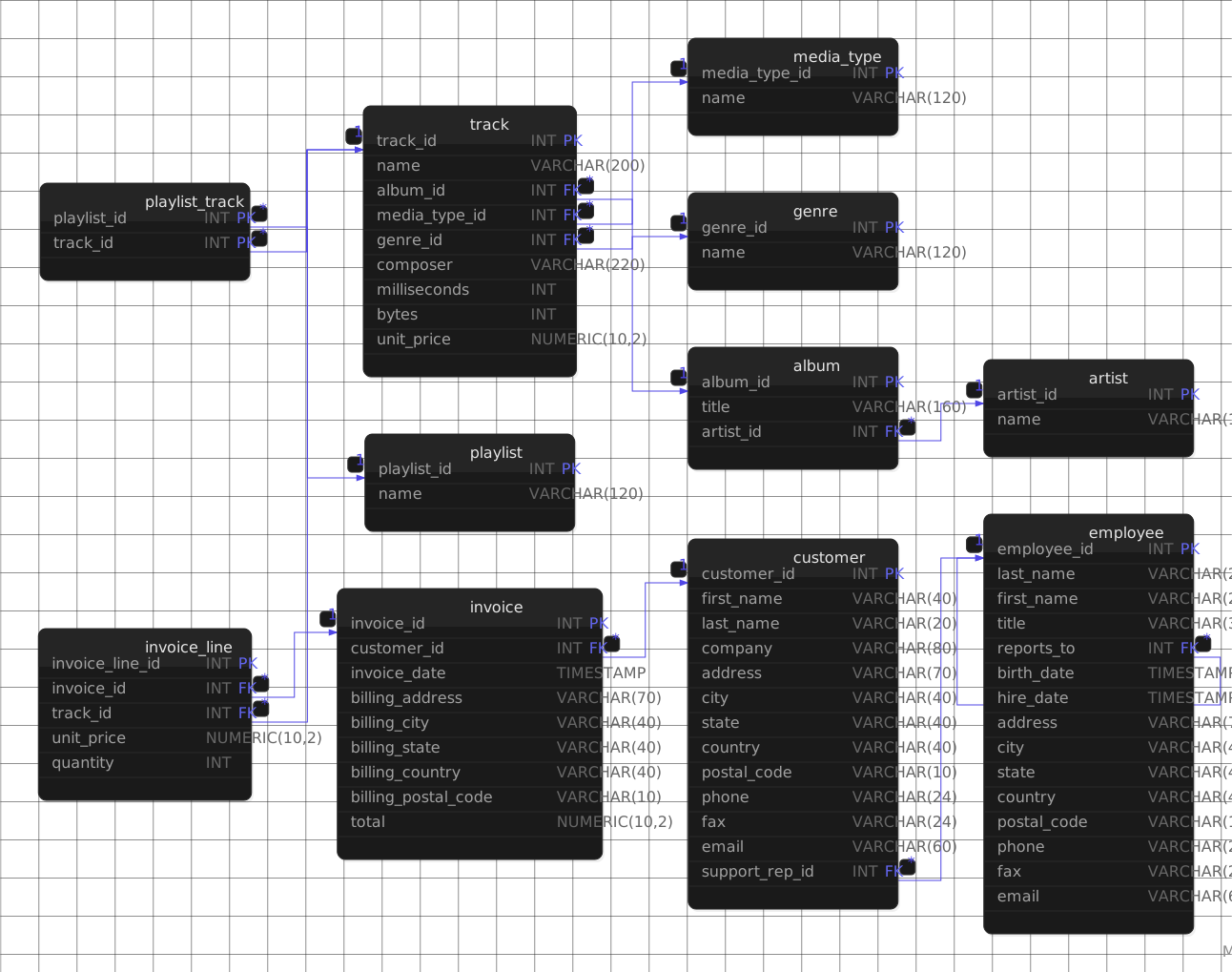
Scroll horizontally to see the full diagram. Click it to open at full size.
Paste this HTML into a README, docs page, or blog post. The image links back to the full schema page.
<a href="https://www.dbdiagramr.space/schema/chinook">
  <img src="https://www.dbdiagramr.space/schemas/chinook-er-diagram.svg" alt="Chinook Database Schema Diagram (PostgreSQL)" width="1292" height="1019" />
</a>
<p><a href="https://www.dbdiagramr.space/schema/chinook">Chinook Database Schema Diagram (PostgreSQL)</a> by dbdiagramr</p>| Column | Type | Nullable | Key |
|---|---|---|---|
| album | |||
| album_id | INT | No | PK |
| title | VARCHAR(160) | No | - |
| artist_id | INT | No | FK → artist.artist_id |
| artist | |||
| artist_id | INT | No | PK |
| name | VARCHAR(120) | Yes | - |
| customer | |||
| customer_id | INT | No | PK |
| first_name | VARCHAR(40) | No | - |
| last_name | VARCHAR(20) | No | - |
| company | VARCHAR(80) | Yes | - |
| address | VARCHAR(70) | Yes | - |
| city | VARCHAR(40) | Yes | - |
| state | VARCHAR(40) | Yes | - |
| country | VARCHAR(40) | Yes | - |
| postal_code | VARCHAR(10) | Yes | - |
| phone | VARCHAR(24) | Yes | - |
| fax | VARCHAR(24) | Yes | - |
| VARCHAR(60) | No | - | |
| support_rep_id | INT | Yes | FK → employee.employee_id |
| employee | |||
| employee_id | INT | No | PK |
| last_name | VARCHAR(20) | No | - |
| first_name | VARCHAR(20) | No | - |
| title | VARCHAR(30) | Yes | - |
| reports_to | INT | Yes | FK → employee.employee_id |
| birth_date | TIMESTAMP | Yes | - |
| hire_date | TIMESTAMP | Yes | - |
| address | VARCHAR(70) | Yes | - |
| city | VARCHAR(40) | Yes | - |
| state | VARCHAR(40) | Yes | - |
| country | VARCHAR(40) | Yes | - |
| postal_code | VARCHAR(10) | Yes | - |
| phone | VARCHAR(24) | Yes | - |
| fax | VARCHAR(24) | Yes | - |
| VARCHAR(60) | Yes | - | |
| genre | |||
| genre_id | INT | No | PK |
| name | VARCHAR(120) | Yes | - |
| invoice | |||
| invoice_id | INT | No | PK |
| customer_id | INT | No | FK → customer.customer_id |
| invoice_date | TIMESTAMP | No | - |
| billing_address | VARCHAR(70) | Yes | - |
| billing_city | VARCHAR(40) | Yes | - |
| billing_state | VARCHAR(40) | Yes | - |
| billing_country | VARCHAR(40) | Yes | - |
| billing_postal_code | VARCHAR(10) | Yes | - |
| total | NUMERIC(10,2) | No | - |
| invoice_line | |||
| invoice_line_id | INT | No | PK |
| invoice_id | INT | No | FK → invoice.invoice_id |
| track_id | INT | No | FK → track.track_id |
| unit_price | NUMERIC(10,2) | No | - |
| quantity | INT | No | - |
| media_type | |||
| media_type_id | INT | No | PK |
| name | VARCHAR(120) | Yes | - |
| playlist | |||
| playlist_id | INT | No | PK |
| name | VARCHAR(120) | Yes | - |
| playlist_track | |||
| playlist_id | INT | No | PK, FK → playlist.playlist_id |
| track_id | INT | No | PK, FK → track.track_id |
| track | |||
| track_id | INT | No | PK |
| name | VARCHAR(200) | No | - |
| album_id | INT | Yes | FK → album.album_id |
| media_type_id | INT | No | FK → media_type.media_type_id |
| genre_id | INT | Yes | FK → genre.genre_id |
| composer | VARCHAR(220) | Yes | - |
| milliseconds | INT | No | - |
| bytes | INT | Yes | - |
| unit_price | NUMERIC(10,2) | No | - |
10 relationships connect the tables in this schema. Each entry shows the child columns, the parent columns they reference, and the cardinality.
album.artist_id → artist.artist_id
One artist can have many albums (album.artist_id -> artist.artist_id, required).
customer.support_rep_id → employee.employee_id
One employee can have many customers (customer.support_rep_id -> employee.employee_id, optional).
employee.reports_to → employee.employee_id
One employee can have many child employees (employee.reports_to -> employee.employee_id, optional).
invoice.customer_id → customer.customer_id
One customer can have many invoices (invoice.customer_id -> customer.customer_id, required).
invoice_line.invoice_id → invoice.invoice_id
One invoice can have many invoice lines (invoice_line.invoice_id -> invoice.invoice_id, required).
invoice_line.track_id → track.track_id
One track can have many invoice lines (invoice_line.track_id -> track.track_id, required).
playlist_track (playlist_id -> playlist.playlist_id, track_id -> track.track_id)
Many playlists can have many tracks through playlist_track (playlist_track.playlist_id -> playlist.playlist_id, playlist_track.track_id -> track.track_id).
track.album_id → album.album_id
One album can have many tracks (track.album_id -> album.album_id, optional).
track.genre_id → genre.genre_id
One genre can have many tracks (track.genre_id -> genre.genre_id, optional).
track.media_type_id → media_type.media_type_id
One media type can have many tracks (track.media_type_id -> media_type.media_type_id, required).
| Relationship | Type | Meaning |
|---|---|---|
| album.artist_id → artist.artist_id | One-to-many | One artist can have many albums (album.artist_id -> artist.artist_id, required). |
| customer.support_rep_id → employee.employee_id | One-to-many | One employee can have many customers (customer.support_rep_id -> employee.employee_id, optional). |
| employee.reports_to → employee.employee_id | Self-referencing | One employee can have many child employees (employee.reports_to -> employee.employee_id, optional). |
| invoice.customer_id → customer.customer_id | One-to-many | One customer can have many invoices (invoice.customer_id -> customer.customer_id, required). |
| invoice_line.invoice_id → invoice.invoice_id | One-to-many | One invoice can have many invoice lines (invoice_line.invoice_id -> invoice.invoice_id, required). |
| invoice_line.track_id → track.track_id | One-to-many | One track can have many invoice lines (invoice_line.track_id -> track.track_id, required). |
| playlist_track (playlist_id -> playlist.playlist_id, track_id -> track.track_id) | Many-to-many | Many playlists can have many tracks through playlist_track (playlist_track.playlist_id -> playlist.playlist_id, playlist_track.track_id -> track.track_id). |
| track.album_id → album.album_id | One-to-many | One album can have many tracks (track.album_id -> album.album_id, optional). |
| track.genre_id → genre.genre_id | One-to-many | One genre can have many tracks (track.genre_id -> genre.genre_id, optional). |
| track.media_type_id → media_type.media_type_id | One-to-many | One media type can have many tracks (track.media_type_id -> media_type.media_type_id, required). |
These PostgreSQL queries run against the schema shown on this page.
Rank tracks by invoice-line quantity.
select t.name, sum(il.quantity) as units
from track t
join invoice_line il on il.track_id = t.track_id
group by t.track_id, t.name
order by units desc, t.name;Sum invoice totals for each customer country.
select c.country, sum(i.total) as revenue
from invoice i
join customer c on c.customer_id = i.customer_id
group by c.country
order by revenue desc;Sum track sales grouped by genre.
select g.name, sum(il.unit_price * il.quantity) as revenue
from invoice_line il
join track t on t.track_id = il.track_id
join genre g on g.genre_id = t.genre_id
group by g.name
order by revenue desc;Count tracks in each playlist.
select p.name, count(pt.track_id) as tracks
from playlist p
left join playlist_track pt on pt.playlist_id = p.playlist_id
group by p.playlist_id, p.name
order by tracks desc, p.name;Paste your PostgreSQL connection string and get an interactive ER diagram of your own schema in under 10 seconds. No signup required.
Try it free →